
Starting with webhooks
Set up a webhook, secure it with a signing secret, and test the delivery.
Webhooks let external services be notified when certain events happen in
PeopleForce. When a subscribed event occurs, PeopleForce sends a POST request
to each URL you configure.
Setting up a webhook
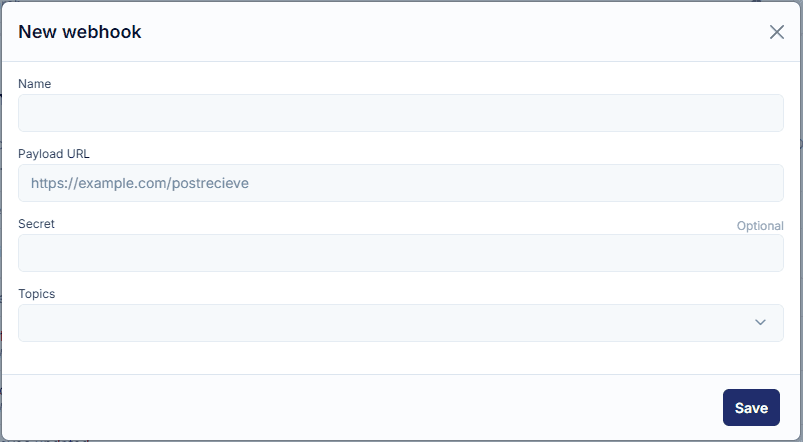
Go to Settings → Webhooks → Add new webhook and fill in four fields:
- Name — a label so you can find the webhook later.
- Payload URL — the server that receives the webhook
POSTrequests. It must use a valid SSL certificate from a publicly trusted CA. - Secret — an optional string used to sign requests (see below).
- Topics — the events you want to be notified about; you can choose multiple.
Save the webhook and it's live. See the full list of events in the Webhooks overview.
Secrets
A secret is a shared string used to authenticate webhook deliveries. If you set
one, PeopleForce signs each request and adds an x-peopleforce-signature
header. Without the secret, no one else can forge a request with a matching
signature.
To verify the signature:
- It is computed with HMAC-SHA256 over the raw request body, keyed with your secret.
- The result is a hexadecimal digest, prefixed with
sha256=. - Compare it against the
x-peopleforce-signatureheader using a constant-time comparison to avoid timing attacks. - Treat the payload as UTF-8 encoded text.
def verify_signature(payload_body, signature_header)
  secret_key = ENV['WEBHOOK_SECRET']
  computed_signature = 'sha256=' + OpenSSL::HMAC.hexdigest(OpenSSL::Digest.new('sha256'), secret_key, payload_body)
  unless Rack::Utils.secure_compare(computed_signature, signature_header)
    return halt 500, "Signatures didn't match!"
  end
endimport hmac
import hashlib
import os
def verify_signature(payload_body, signature_header):
secret_token = os.getenv('WEBHOOK_SECRET')
if not signature_header:
raise HTTPException(status_code=403, detail="Missing signature header!")
hash_object = hmac.new(key=secret_token.encode('utf-8'), msg=payload_body.encode('utf-8'), digestmod=hashlib.sha256)
expected_signature = 'sha256=' + hash_object.hexdigest()
if not hmac.compare_digest(expected_signature, signature_header):
raise HTTPException(status_code=403, detail="Signatures did not match!")Testing a webhook
When an event fires, PeopleForce delivers the JSON payload as the body of the
POST request. To try it out, point the Payload URL at a request inspector such
as webhook.site (external link — be mindful of your
data), then trigger the event. For a new employee, the payload looks like:
{
  "action": "employee_create",
  "data": {
    "id": 130333,
    "attributes": {
      "employee_number": "PF124593",
      "hired_on": "2022-09-12",
      "probation_ends_on": "2022-12-12",
      "first_name": "John",
      "last_name": "Doe",
      "email": "john@peopleforce.io",
      "personal_email": null,
      "gender": "male",
      "mobile_number": "",
      "work_phone_number": "",
      "date_of_birth": "1978-08-31",
      "termination_effective_date": null,
      "termination_comment": null,
      "avatar_url": null
    },
    "reporting_to": { "id": 5844, "full_name": "Ross Kate", "email": "kate@peopleforce.io" },
    "employment_type": { "id": 1899, "name": "Full-Time" },
    "position": { "id": 11943, "name": "Senior Developer" },
    "department": { "id": 5094, "name": "IT" },
    "division": { "id": 1819, "name": "Europe" },
    "location": null,
    "custom_fields": {
      "2692d87e-c388-49ea-b903-616bc1557746": { "name": "T-shirt size", "value": "M", "group": "Personal" }
    },
    "meta": {
      "created_at": "2022-09-05T18:33:55.130+03:00",
      "updated_at": "2022-09-05T18:33:55.526+03:00"
    }
  }
}
Webhook payloads are emitted by the PeopleForce platform and use the platform's own field names — they are independent of the REST API version you call.
Execution history
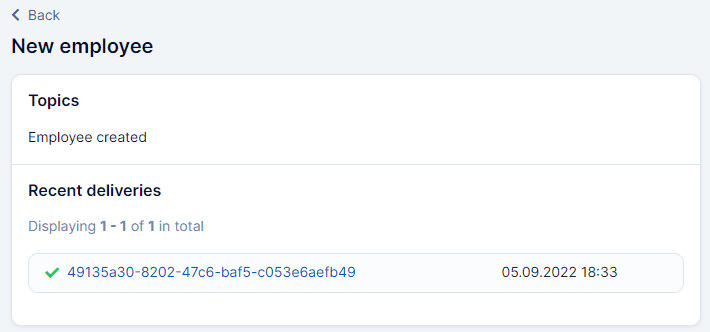
To confirm a delivery, go to Settings → Webhooks and click a webhook's name to see its execution history. Click any delivery to view the raw data that was sent.
Troubleshooting
If a delivery didn't arrive or didn't look right:
- Check the Payload URL is correct and the receiving server supports webhooks.
- Check the webhook's run history. If it was delivered, re-check step 1, then step 3.
- Make sure your receiving server is up and healthy.
| Status | Meaning |
|---|---|
| 200 Success | Webhook was delivered. |
| 404 Not Found | The resource could not be found — check it refers to an existing object. |
| 500 Internal Server Error | A problem on our side — try again later or contact support. |
If none of these help, contact us.